Meet Groove: Handwritten SMuFL Fonts for Professional Jazz Scores
A professional handwritten music font package for Dorico, Finale v27+ and MuseScore 4.6+ — designed to bring the lively personality of classic Broadway and West Coast copyist scores into modern notation software.
8 Jazzy Text Fonts
Dorico
Finale v27+
MuseScore 4.6+
MacOS & Windows
A Handwritten Jazz Score Style with Real Momentum
Some handwritten music fonts are subtle. Groove is more direct: full of energy, character and performance-ready clarity. It gives your scores the feeling of a hand-prepared jazz or Broadway chart while staying practical inside today’s notation applications.
The family combines personality with professional usability. Clefs, noteheads, accidentals, articulations, dynamics, rehearsal marks and score text all work together to create a unified handwritten page. The result is a score that feels less mechanical and more musical from the first glance.
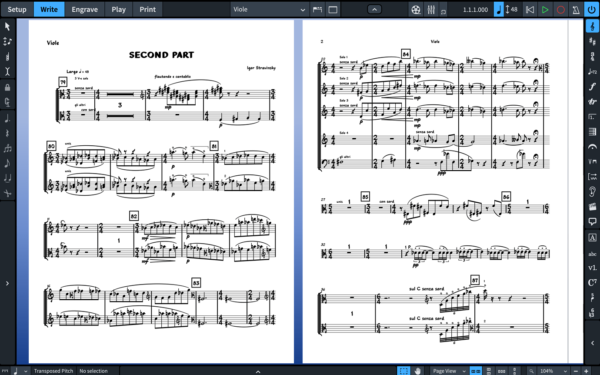
Groove is especially effective for jazz charts, theatre scores, rhythm-section parts, piano-vocal layouts, educational examples and full-score projects that need warmth, attitude and a clear hand-copied identity.
10 Fonts for Professional Handwritten Jazz Scores
The Groove package includes two SMuFL-compliant music fonts and eight jazzy text fonts. That combination gives you more than a music-symbol swap: it lets the whole page share the same handwritten design language.
2 SMuFL Music Fonts
Two handwritten SMuFL music fonts with more than 1400 music symbols, designed as expressive alternatives to standard engraved and jazz notation fonts.
8 Jazzy Text Fonts
Matching text fonts for titles, default text, music text, rehearsal marks, paragraph styles and score directions.
Using the included text fonts alongside the music fonts helps the notation, lyrics, directions and markings feel like one complete score style.
Built for Dorico, Finale v27+ and MuseScore 4.6+
Groove is designed for real notation workflows on MacOS and Windows. Install the package, select Groove as your music font, and continue editing directly inside Dorico, Finale or MuseScore.
In Dorico, the included metadata makes Groove available in the music font list. You can apply it from Engrave mode and optionally use the recommended engraving options. In Finale v27+, you can select Groove through the default music font settings.
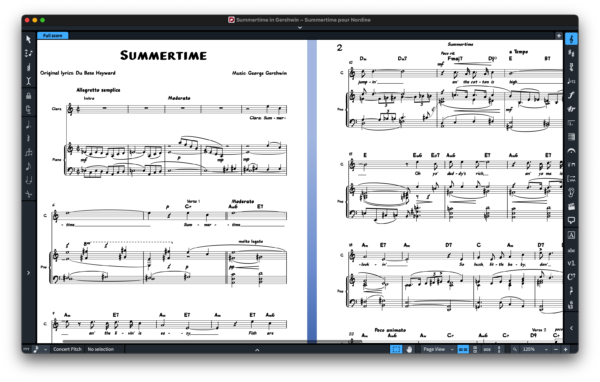
Classic Broadway Energy, West Coast Copyist Personality
Groove draws its character from the practical beauty of hand-prepared Broadway and jazz scores. It has the kind of immediate, player-friendly look associated with West Coast copyists: bold enough to have personality, clean enough to survive rehearsal.
Because the family includes both music and text fonts, Groove can shape the entire score environment: notes, rests, clefs, articulations, dynamics, titles, rehearsal marks, directions and music text.
Explore Groove in Scores, Parts, Piano-Vocal Layouts and Charts
The sample PDFs show Groove in a wide range of notation situations, from orchestral parts and full scores to piano-vocal material and rhythm-section chart examples. They are useful for checking page color, spacing, symbol consistency and performance readability.
Part
Contrabasso — Second Part
A low-string part sample for checking rests, expressive text and part readability.
Full Score
Second Part
A compact ensemble score for checking spacing, layers and symbol consistency.
Piano-Vocal
Clocks
A piano-vocal sample for reviewing lyrics, keyboard notation and text treatment.
Part
Viole — Second Part
A viola part sample for checking slurs, dynamics and multi-page part flow.
Sample
Groove Sample
A general sample for comparing the font’s overall handwritten music style.
Score
Constellations
A contemporary score sample for testing modern notation and expressive text.
Easy Installation on MacOS and Windows
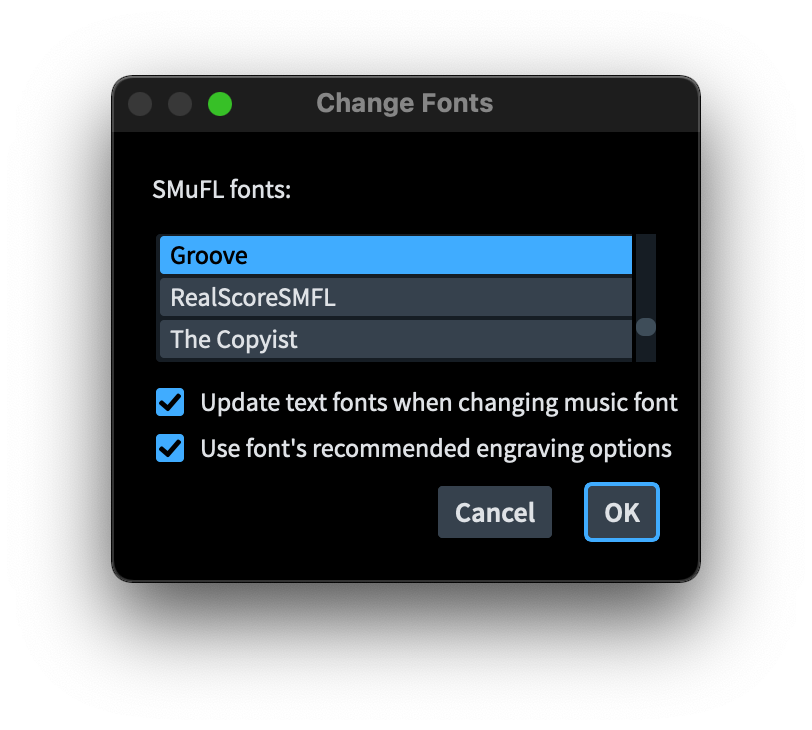
Groove comes with two installers, one for MacOS and one for Windows. After installation, the font can be applied in Dorico from the Engrave > Music Font menu, and the included text fonts can be assigned to default text, font styles and music text styles for a more complete score appearance.
Install Groove
Run the installer for your operating system and install the music and text fonts together.
Change the Music Font
Select Groove inside Dorico, Finale v27+ or MuseScore 4.6+ so the score adopts the SMuFL handwritten symbols.
Match the Text
Use the Groove text fonts for paragraph styles, default text, titles, directions and music text.
Where Groove Shines
Groove is a strong choice for projects that need the clarity of professional notation and the rhythmic energy of a handwritten jazz score.
- Jazz lead sheets
- Broadway-style arrangements
- Rhythm-section charts
- Piano-vocal scores
- Orchestral and chamber parts
- Educational examples
- Concert scores with handwritten character
- Publishing projects needing warmth and personality
Because Groove includes both music notation fonts and matching text fonts, it can define the full visual voice of a score — from the first clef to the last rehearsal instruction.
Ready to Give Your Scores a Groove Voice?
Groove is available from NorFonts as a 10-font handwritten SMuFL package with two music fonts, eight jazzy text fonts, MacOS and Windows installers, and support for Dorico, Finale v27+ and MuseScore 4.6+.


