Organized music glyph collections for FontLab and FontCreator, with a look at the original SMuFL for Glyphs 4 project.
Working with thousands of musical symbols can be one of the most time-consuming aspects of music font development.
The Standard Music Font Layout (SMuFL) provides a common framework for organizing musical glyphs, but navigating its extensive repertoire within a font editor is not always straightforward.
To simplify this process, I recently published two free, open-source projects under NorFonts:
Both projects organize approximately 2,940 SMuFL glyph definitions into meaningful musical groups, making it easier to browse and locate symbols while designing music fonts.
These tools build on classification resources from SMuFL for Glyphs 4, developed by Shinianqi, whose project is introduced later in this article.
1. SMuFL Menus for FontLab 8 & 9 — NorFonts
Project: https://github.com/NorFonts/SMuFL-Menus-FontLab8-9
The first project brings organized SMuFL collections to FontLab 8 and FontLab 9 through the application’s native Encoding menu.
Rather than navigating a long sequence of Unicode positions or searching individually for musical symbols, designers can browse collections organized according to musical function.
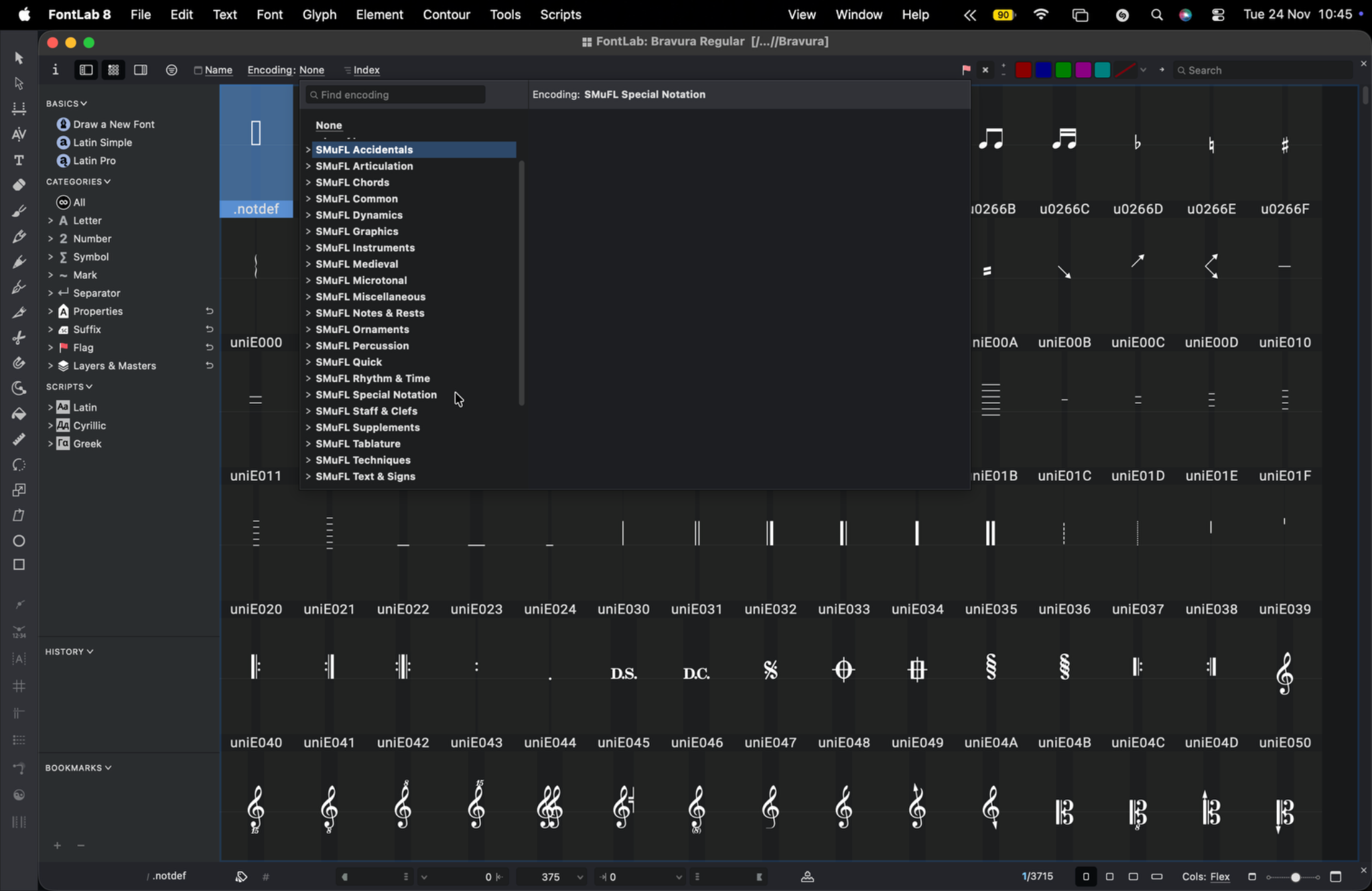
23 Musical Groups and Approximately 203 Collections
The Python-based generator produces native FontLab .enc files covering categories such as:
- Staff structure, clefs, notes, and rests.
- Accidentals and microtonal notation.
- Rhythm, time signatures, and repetitions.
- Dynamics, articulations, ornaments, and playing techniques.
- Percussion and instrument-specific symbols.
- Chords, tablature, and historical notation.
- Special notation, musical signs, and text-related symbols.
In total, the project provides 23 musical groups and approximately 203 Encoding collections, depending on source metadata and duplicate consolidation.
These collections appear in FontLab’s Encoding selector, making related symbols easier to find during font development.
Important distinction: The project does not create folders in FontLab’s left-hand Bookmarks panel. Its integration is designed specifically for the native Encoding menu.
Unicode-Based Glyph Naming
The generated collections use Unicode-style glyph names, such as uniE050 and uniE0A4.
FontLab matches these names against glyphs in the open font. Consequently, fonts using canonical SMuFL glyph names may require a different naming mapping.
The generator does not rename glyphs or modify existing outlines.
Installation and Safety
The installer follows a strictly add-only approach:
- A read-only PREVIEW mode displays planned changes.
- New Encoding files are created without replacing existing files.
- Existing collections are preserved.
- No files are renamed, deleted, or backed up.
- FontLab application bundles and preferences remain unchanged.
The goal is to make the SMuFL repertoire easier to navigate without interfering with an existing font-development environment.
Compatibility
This project remains experimental. The organized menu has been inspected in FontLab 8, but complete end-to-end compatibility across FontLab 8 and FontLab 9 has not been fully verified. The supplied launcher and installation paths are intended for macOS. Windows compatibility has not been tested.
Explore the FontLab project, installation instructions, and actual screenshots on GitHub.
2. SMuFL Menus for FontCreator 16 — NorFonts
Project: https://github.com/NorFonts/SMuFL-Menu-FontCreator16
The second NorFonts project brings a similar organizational approach to FontCreator 16, using the application’s native Glyph Sets system.
Unlike FontLab, which relies on Encoding collections, FontCreator uses .glyphset files to display related glyphs inside its Categories panel.
The NorFonts adaptation generates these files automatically, creating organized SMuFL collections that integrate into FontCreator’s existing interface.
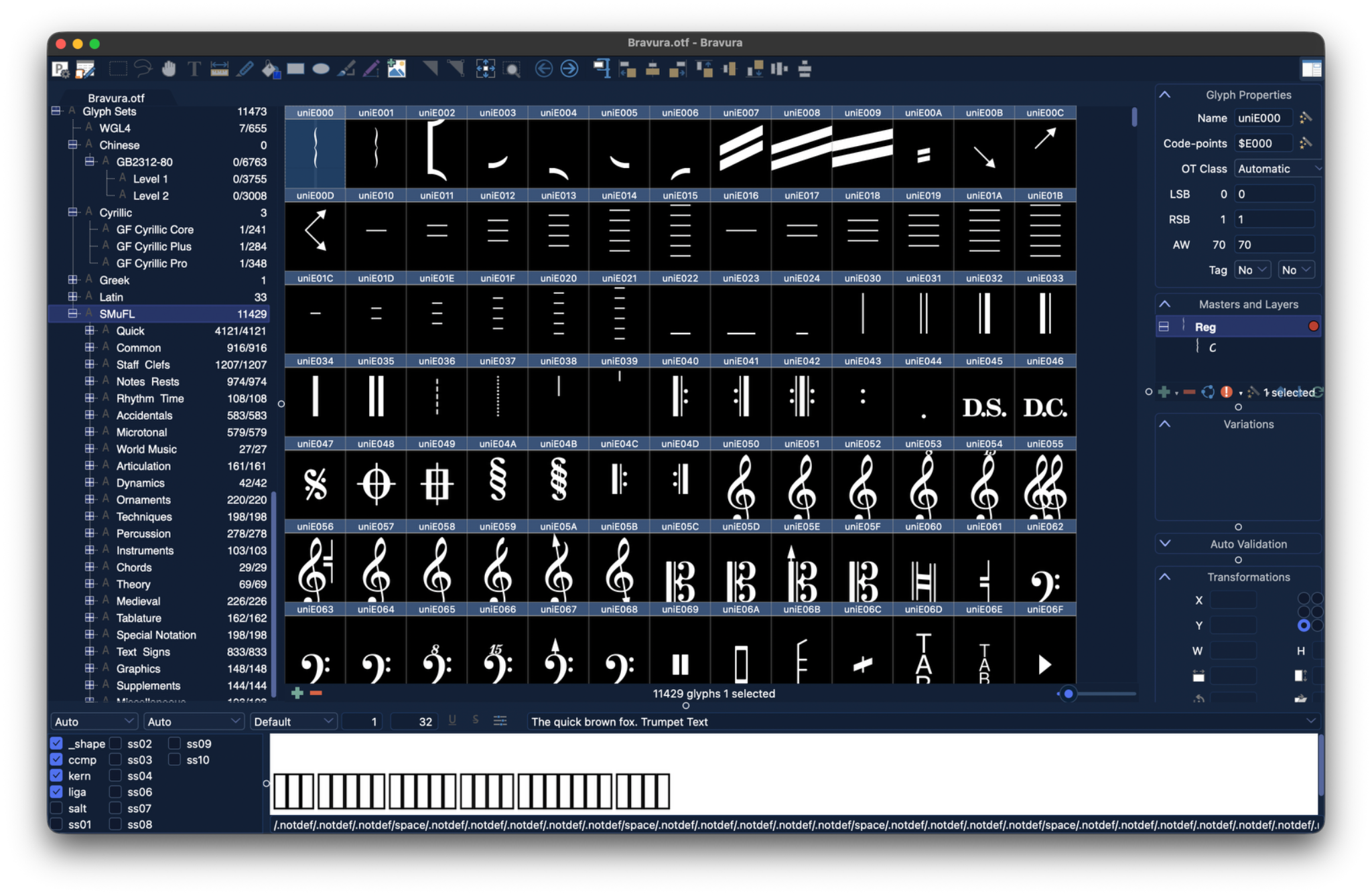
23 Musical Groups and 218 Subcollections
The project organizes the repertoire into 23 musical groups and 218 subcollections.
Once installed, the collections are accessible through Categories → Glyph Sets → SMuFL.
This allows designers to browse related musical symbols without leaving FontCreator’s native category browser. The organization covers clefs, notes, rests, accidentals, articulations, ornaments, percussion, microtonal symbols, historical notation, and more.
Three Installation Options
The FontCreator installer offers three modes:
- PREVIEW: Displays the planned additions without writing files.
- ADD ONE: Adds only the Accidentals collection, allowing users to test the process with a limited set.
- ADD ALL: Adds all missing SMuFL Glyph Sets.
The generated files are installed in the user’s personal FontCreator 16 settings folder rather than inside the application bundle.
Safe, Add-Only Behavior
As with the FontLab version, protecting existing files was a central design requirement. The installer:
- Creates new
.glyphsetfiles using exclusive file creation. - Never overwrites, renames, deletes, or backs up existing Glyph Sets.
- Detects matching existing SMuFL categories and skips them.
- Rejects invalid or symlinked destination paths.
- Does not modify application resources or existing font outlines.
Browsing the collections does not alter the font itself. However, FontCreator’s own Complete Category command can add missing glyphs to an open font. That command should only be used intentionally.
Compatibility
The project has been tested with FontCreator 16 on macOS 27 Golden Gate. Other macOS versions and Windows compatibility have not been verified. The supplied .command installer is intended specifically for macOS.
Explore the FontCreator project, installation instructions, and genuine screenshots on GitHub.
3. What the Two NorFonts Projects Have in Common
Although FontLab and FontCreator use different formats, both NorFonts projects follow the same general philosophy: making SMuFL glyph navigation more practical for music font designers.
| Feature | FontLab 8 & 9 | FontCreator 16 |
|---|---|---|
| Developer | NorFonts | NorFonts |
| Main integration | Encoding menu | Categories → Glyph Sets |
| Generated format | .enc |
.glyphset |
| Musical groups | 23 | 23 |
| Collections | Approximately 203 | 218 |
| Source glyph definitions | Approximately 2,940 | Approximately 2,940 |
| Preview mode | Yes | Yes |
| Add-only installation | Yes | Yes |
| Windows tested | No | No |
Both projects are written in Python and distributed as independent, open-source resources.
They do not modify font outlines, automatically produce finished SMuFL fonts, or replace technical validation in notation software. Instead, they address a specific part of the development workflow: organizing the musical glyph repertoire so designers can concentrate on the symbols they are creating.
4. The Original SMuFL for Glyphs 4 — By Shinianqi
Project: https://github.com/Shinianqi/SMuFL-Glyphs4
The two NorFonts adaptations build on classification resources made available by Shinianqi, developer of the open-source SMuFL for Glyphs 4 project.
This project provides SMuFL classification tables and a metadata exporter for Glyphs 4 on macOS.
It organizes the repertoire into two principal sidebar categories: SMuFL Common Glyphs, containing practical musical classifications such as staff structure, clefs, notes, rests, accidentals, dynamics, and articulations; and SMuFL Glyphs, providing broader access through SMuFL classes and ranges.

The project documents approximately:
| Resource | Count |
|---|---|
| Glyph definitions | 2,940 |
| SMuFL classes | 85 |
| SMuFL ranges | 132 |
| Startup presets | 5 |
Metadata Export and Anchor Support
Beyond navigation, Shinianqi’s project offers functionality for exporting SMuFL font metadata as JSON. Supported metadata includes glyph advance widths, attachment anchors, bounding boxes, engraving defaults, alternate glyphs, and other font-specific information.
The project also provides procedures for setting selected musical anchors.
According to its documentation, the Glyphs 4 script has been incorporated into the SMuFL source repository.
This is an important distinction: Shinianqi’s project offers metadata-related functionality beyond the glyph-navigation capabilities of the two NorFonts adaptations.
I would like to acknowledge and thank Shinianqi for making these resources publicly available. Their classification data provided a valuable foundation for extending the approach to FontLab and FontCreator.
Explore the original Glyphs 4 project on GitHub.
5. Organized Glyph Collections Are Only One Part of SMuFL Font Development
Having convenient access to musical glyphs is useful, but it does not automatically make a font SMuFL-compliant.
Successful music font development requires careful attention to several related areas:
- Glyph outlines and geometry determine the visual appearance and proportions of individual musical symbols.
- Font metrics and advance widths influence spacing and positioning.
- Attachment anchors provide the coordinates needed to connect stems, articulations, and other musical elements.
- Engraving defaults define measurements used for consistent notation, including staff lines, beams, stems, and ledger lines.
- SMuFL metadata connects these design decisions to structures expected by notation software.
- Application testing helps verify that the completed font behaves correctly in real musical scores.
For readers interested in these technical aspects, I have published additional NorFonts guides:
- How to Create a SMuFL Music Font: From Glyph Design to Accurate Metadata
- How to Place SMuFL Anchors: From Bézier Geometry to Accurate Music Engraving
These articles explore the relationship between glyph design, Bézier geometry, precise measurements, and reliable notation.
6. Open Source and Community Feedback
The FontLab and FontCreator adaptations are available under the Apache License 2.0 for their original project code, with applicable third-party copyrights and licensing notices preserved in their repositories.
They are independent community projects, not official extensions of FontLab or FontCreator, and are not endorsed by the W3C Music Notation Community Group.
The objective is to provide useful, accessible resources for music font designers while encouraging experimentation, feedback, and further improvements.
Suggestions, technical observations, and bug reports are welcome through the respective GitHub repositories.
7. Download the Projects
NorFonts — SMuFL Menus for FontLab 8 & 9
https://github.com/NorFonts/SMuFL-Menus-FontLab8-9
NorFonts — SMuFL Menus for FontCreator 16
https://github.com/NorFonts/SMuFL-Menu-FontCreator16
Shinianqi — SMuFL for Glyphs 4
https://github.com/Shinianqi/SMuFL-Glyphs4
Always review the individual README files, compatibility information, and installation instructions before using an installer.
Conclusion
SMuFL music font development combines typography, music engraving, technical precision, and careful organization.
With thousands of musical symbols available, a well-structured browsing system can make a meaningful difference to the everyday workflow of a font designer.
The two NorFonts SMuFL Menus projects bring this organizational approach to FontLab 8 & 9 and FontCreator 16, each using the native collection format supported by its respective editor.
Together with Shinianqi’s earlier work for Glyphs 4, they provide complementary tools for designers working across different font-development environments.
I hope these projects will make the process of creating and maintaining SMuFL music fonts a little easier.
Enjoy!
© 2026 Nor Eddine Bahha — NorFonts. All rights reserved except as expressly licensed.
Acknowledgment: The original SMuFL for Glyphs 4 project was developed by Shinianqi. The FontLab and FontCreator adaptations are independent NorFonts projects. Please consult the individual repositories for licensing and third-party attribution.